Loaded Modules
Use the Diagnostics > Loaded Modules option on the About dialog box to view file information for the modules loaded in your system, sorted by Name, Company, or Description. Results are listed in a table below the search filter. Double-click any results row to view the properties for that module.
|
Loaded Module Dialog Box |
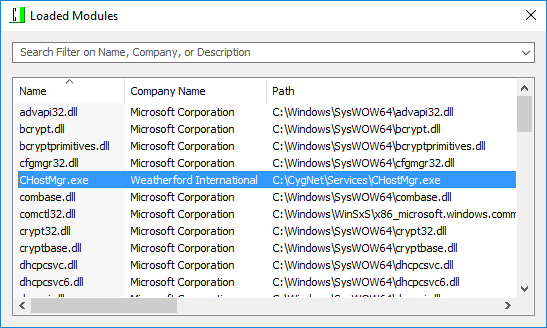
Information listed in the table is as follows.
| Column | Description |
|---|---|
|
Name |
The module name. Can be used as search criteria. |
|
Company Name |
The company name associated with the module. Can be used as search criteria. |
|
Path |
The directory location file path. |
|
File Size |
The size of the module file. |
|
Timestamp |
The date and time the module was last edited. |
|
Version |
The module version number. |
|
Description |
The file description. Can be used as search criteria. |
|
Base |
The module base. |
|
Size |
The size of the module. |
Filter Modules List
Type any value to filter the list of Loaded Modules in the list.
Organize Search Results
Columns can be reorganized for the most efficient viewing of information in the following ways.
- Hover over a column edge to display an icon to Reset column width. Drag the column to the desired width.
- Click on any data column header to sort the display (in ascending or descending order) based on the values in the selected property column.
- Click on any data column header to Drag a column header left or right to the desired location.


